ads

terça-feira, 29 de julho de 2008

Google faz investida no mercado de tecnologia empresarial do Brasil

Gigante da internet faz parcerias locais para lucrar com segmento de softwares empresariais

O Google anunciou recentemente a sua nova estratégia para aumentar a presença da unidade Enterprise, responsável pela venda de tecnologia para empresas, no Brasil. Para isso, fechou três acordos com distribuidores e revendas locais.
A joint venture Apontador Maplink comercializará o Maps API Premier, versão empresarial do Google Maps, com contrato de garantia de nível de serviço e suporte, por preços a partir de US$ 16 mil. O produto é destinado a grandes bancos, redes de varejo, montadoras, empresas de seguro, rastreadoras de veículos, operadoras de telefonia fixa e móvel, etc..
Já a empresa Spread ficará responsável pela comercialização do Google Apps Premier Edition, pacote de produtividade pessoal para empresas. A suíte de aplicativos online, que inclui editor de textos, planilhas e gestão de conteúdo, além de e-mail personalizado para empresas, custa a partir de US$ 74,00 por usuário/ano.
Por sua vez, a distribuidora Westcon vai trabalhar com o Google Search Appliance (GSA) e o Mini, sistemas de busca de informações e documentos dentro das redes empresariais. A companhia será responsável por oferecer assistência técnica aos produtos. O Search Appliance tem preço a partir de US$ 70 mil (para até 500 mil documentos). Já o Google Mini é vendido a partir de US$ 7,5 mil (para até 50 mil documentos).

sexta-feira, 4 de julho de 2008

Site divulga dados da atividade solar e sua interferência na Terra


O Programa de Clima Espacial do Instituto Nacional de Pesquisas Espaciais (Inpe) está lançando um site para monitorar a atividade solar, o meio interplanetário, o campo magnético terrestre e as condições ionosféricas.


No endereço www.inpe.br/climaespacial será possível ver imagens da atividade solar atualizadas quase em tempo real. O internauta poderá observar a intensidade do campo magnético terrestre minuto a minuto, verificar como está a densidade da ionosfera sobre o Brasil e acompanhar o nível de cintilação do sinal do sistema de navegação GPS.


Nos ambientes espaciais podem ocorrer fenômenos capazes de causar interferências em sistemas globais de navegação por satélites (GNSS) e em veículos de sensoriamento remoto. Esses fenômenos são particularmente mais intensos no ambiente espacial brasileiro, devido à grande extensão territorial do país, distribuída ao norte e ao sul do equador geomagnético, à declinação geomagnética máxima e à presença da anomalia magnética do Atlântico Sul.
Programa de Clima Espacial


As informações para estudo do Clima Espacial são obtidas por radiotelescópios, telescópios de múons, estações de recepção GPS, observatórios de ionosfera e estações de magnetômetro. Os dados são enviados em tempo real através da internet ou pelo satélite SCD. O Inpe também utiliza dados dos satélites Soho, ACE, Cluster, entre outros, através de cooperação institucional.
O Programa de Clima Espacial do Inpe pretende divulgar as informações aos interessados como, por exemplo, empresas do setor de telecomunicações, energético, mineral e de tecnologias espaciais.


Fonte: MundoGeo

quinta-feira, 26 de junho de 2008

Downloads do Firefox 3 ao Redor do Mundo


Em Firefox, Brasil bate todos do Bric

Pelo menos em baixação de Firefox o Brasil é melhor que a Índia, a Rússia e a China. Hoje no início da noite, quando o número de downloads do browser se aproximava de 2 milhões, o Brasil já marcava mais de 79 mil.
O resto do Bric estava muito atrás. A Federação Russa registrava pouco mais de 26 mil downloads. A China, pouco mais de 39 mil. A Índia ainda ficava na casa dos 7 mil.
Quem saiu na frente, foram, claro, os americanos: mais de 560 mil, seguidos dos alemães, com 147 mil. As ditaduras, no sentido oposto, ficaram na lanterninha. E ninguém podia ser mais lanterninha que a Coréia do Norte: zero download.

segunda-feira, 23 de junho de 2008

Instalação de Plugins do Eclipse

Instalação de Plugins do Eclipse


Eclipse 2.x:
1. Acesse Help?>Software Updates?>Update Manager;
2. Na View Feature Updates, clique com o direito e selecione New?>Site Bookmark;
3. Dê um nome para o site, em tempo, um nome ainda não usado para outros update sites e depois defina a url do site;
4. Expanda o bookmark que foi adicionado e então, navegue pela lista de plugins;
5. Você verá a lista de versões disponiveis para esse plugin, selecione uma versão, geralmente a mais recente e siga os passos da instalação;
6. Reinicie o Eclipse para finalizar a instalação do plugin.

Eclipse 3.x
1. Acesse Help?>Software Updates?>Find and Install;
2. Selecione Search for new features to install;
3. Clique em Add Update Site;
4. Dê um nome para o site, em tempo, um nome ainda não usado para outros update sites e depois defina a url do site;
5. Expanda o bookmark que foi adicionado e então, navegue pela lista de plugins;
6. Você verá a lista de versões disponiveis para esse plugin, selecione uma versão, geralmente a mais recente e siga os passos da instalação;
7. Reinicie o Eclipse para finalizar a instalação do plugin.


Plugins Interessantes:
JBoss IDE: Este plugin permite iniciar a finalizar servidores, debugar codigo no
lado servidor (server side), realizar deploy de aplicações dentre outras. Ainda
prove suporte para geração de codigo via XDoclet e é mantido pelo JBoss Inc.

Update Site: http://jboss.sourceforge.net/jbosside/updates


Azzurri Plugins: Plugins para desenvolvimento voltado a banco de dados. Dentre os
plugins free estão o Clay - Database Modeling.

Update Site: http://www.azzurri.jp/eclipse/plugins


Velocity UI for Eclipse: Plugin para edição de Templates do Velocity

Update Site: http://veloedit.sourceforge.net/updates/


Hibernate Synchronizer: Hibernate Synchronizer é um plugin para geração de codigo
usado em conjunto com Hibernate, um framework para persistencia de dados. O
plugin gera codigo automaticamente baseado nos arquivos de mapeamento do
Hibernate e refaz a geração quando os mapeamentos são alterados.

Update Site: http://www.binamics.com/hibernatesync


HiberEclipse: HiberClipse é um plugin que gera os arquivos de mapeamento do
Hibernate a partir de uma conexão com o banco de dados e ainda forcene
integração com ferramentas do Hibernate como class2hbm, hbm2java e ddl2hbm.

Update Site: http://hiberclipse.sourceforge.net/siteupdate


Spring IDE for Eclipse: Este projeto fornece um conjunto de plugins para facilitar o
trabalho com a configuração dos arquivos para os Bean Factory do Spring
Framework.

Update Site: http://springframework.sourceforge.net/spring-ide/eclipse/updatesite/


Plug-in: Astom Wizzards

WebSite: renaud91.free.fr/Plugins/index_en.html

Descrição: o Astom Wizzards fornece assistentes para a criação de Servlets, páginas
JSP e Pattern(s)

Update Site: http://renaud91.free.fr/Plugins


Plug-in: WebApp

WebSite: blueskytime.sourceforge.net

Descrição: O WebApp cuida de configurar um ambiente para a execução e depuração do
seu container web preferido, além de fornecer uma estrutura de projeto
adequada a uma aplicação web (um pacote WAR)

Update Site: http://blueskytime.sourceforge.net/eclipse/updates/


Plug-in: DAO

WebSite: www.strecl.com

Descrição: fornece geração automatizada de classes segundo o pattern DAO (Data
Access Object).


Plug-in: Lomboz

WebSite: www.objectlearn.com

Descrição: Execução de containers web, modelos para projetos e componentes de
aplicações web, editores especializados para JSP (incluido recurso de auto
completar), HTML e ainda mais, incluindo recursos para o desenvolvimento de EJBs
centrado no XDoclet.


Plug-in: JFaceDbc

WebSite: http://jfacedbc.sourceforge.net

Descrição: Permite que você veja a estrutura e índices de bases de dados e execute
comandos do SQL, etc..


Plug-in: SuperWaba IDE

WebSite: http://superwaba-ide.sf.net

Descrição: Estende JDT, a fim fornecer uma sustentação melhor para o desenvolvimento
da aplicação de SuperWaba VM

Udate Site: http://superwaba-ide.sourceforge.net/update


Plug-in: VEP (Visual Editor Project)

Arquivo: VE-runtime-0.5.0.zip & VE-examples-0.5.0.zip

WebSite: http://www.eclipse.org/vep/

Descrição: Estrutura para criar construtores do GUI para Eclipse. Inclui
implementações de referência de Swing/JFC e construtores do SWT GUI

Requer: EMF (http://www.eclipse.org/emf/) & GEF (http://www.eclipse.org/gef/)


Plug-in: Easy Struts

Arquivo: org.easystruts.eclipse_0.6.4.zip

WebSite: http://easystruts.sourceforge.net/

Descrição: Manipulação visual do arquivos struts-config.xml

Update Site: http://easystruts.sourceforge.net/eclipse/updates/


Arquivo: xmlbuddy_2.0.5.zip

WebSite: http://www.xmlbuddy.com

Descrição: suporta a highcolor, assistente de codigo, exibição de linha e validação


Arquivo: eclipseuml-installer_1.2.1.20031103.jar

WebSite: http://www.omondo.com

Descrição: Manipulação visual de UML incluindo engenharia reversa


Preclipse: O Preclipse é um plugin para desenvolvimento de aplicações utilizando o
Prevayler. Facilita na criação de classes Transaction e Dados.

Update Site: http://www.preclipse.de/update


AJDT: O AspectJ Development Tools é um plugin para programação orientada a aspectos
baseado no framework AspectJ

Update Site: http://download.eclipse.org/technology/ajdt/30M8/update


ByeCycle - Analisador de código: http://priki.org/svn/byecycle/trunk/updatesite


Subclipse - Para Subversion: http://subclipse.tigris.org/update


EclipseME - http://eclipseme.org/updates/


Site Oficial dos plugins do eclipse

http://eclipse-plugins.2y.net/eclipse/index.jsp


Lembrando que, para baixar os plugins pode ser necessário configurar o proxy.

Configure em: Window -> Preferences

General -> Network Connections

Manual proxy configurator

HTTP proxy host address (o endereço de seu proxy)
HTTP proxy host port (porta do seu proxy)

domingo, 22 de junho de 2008

New Mozilla Firefox 3


New Features
Firefox 3 sets the innovation bar very high with exciting new features, including one-click bookmarking, the smart location bar and lightning fast performance.


Security
Keeping you and your personal information safe is our top priority. Firefox 3 includes phishing and malware protection, plus new instant site ID info.


Productivity
With features like built-in spell checking, session restore and full zoom, Firefox 3 makes it possible to work faster and more efficiently on the Web.


Customization
Your taste and needs set you apart from the rest. With Firefox 3 you can choose from over 5,000 add-ons that help you customize your browsing experience.


Mozilla released Firefox® 3, a major update to its popular and acclaimed free, open source Web browser. Firefox 3 is the culmination of three years of efforts from thousands of developers, security experts, localization and support communities, and testers from around the globe.
Available today in approximately 50 languages, Firefox 3 is two to three times faster than its predecessor and offers more than 15,000 improvements, including the revolutionary smart location bar, malware protection, and extensive under the hood work to improve the speed and performance of the browser.
“We’re really proud of Firefox 3 and it just shows what a committed, energized global community can do when they work together,” said John Lilly, CEO of Mozilla.
What’s New in Firefox 3:
The Web is all about innovation, and Firefox 3 sets the pace with dozens of new features to deliver a faster, more secure and customizable Web browsing experience for all.
User Experience. The enhancements to Firefox 3 provide the best possible browsing experience on the Web. The new Firefox 3 smart location bar, affectionately known as the “Awesome Bar,” learns as people use it, adapting to user preferences and offering better fitting matches over time. The Firefox 3 Library archives browsing history, bookmarks, and tags, where they can be easily searched and organized. One-click bookmarking and tagging make it easy to remember, search and organize Web sites. The new full-page zoom displays any part of a Web page, up close and readable, in seconds.
Performance. Firefox 3 is built on top of the powerful new Gecko 1.9 platform, resulting in a safer, easier to use and more personal product. Firefox 3 now uses less memory while it’s running, and its redesigned page rendering and layout engine means users see Web pages two to three times faster than Firefox 2.
Security. Firefox 3 raises the bar for security. The new malware and phishing protection helps protect from viruses, worms, trojans and spyware to keep people safe on the Web. Firefox 3’s one-click site ID information allows users to verify that a site is what it claims to be. Mozilla’s open source process leverages the experience of thousands of security experts around the globe.
Customization. Everyone uses the Web differently, and Firefox 3 lets users customize their browser with more than 5,000 add-ons. Firefox Add-ons allow users to manage tasks like participating in online auctions, uploading digital photos, seeing the weather forecasts, and listening to music, all from the convenience of the browser. The new Add-ons Manager helps users to find and install add-ons directly from the browser.
For more information about Mozilla Firefox 3 and how it delivers an easier, faster, and safer online experience, visit http://www.mozilla.com/firefox/features.
Mozilla Firefox 3 is available now for Windows, Linux, and Mac OS X operating systems as a free download from http://www.getfirefox.com/.
The release of Firefox 3 kicks off Download Day, the Mozilla community’s grassroots campaign to set a brand new Guinness World Record for the greatest number of software downloads in 24 hours. The worldwide community effort begins the minute Firefox 3 is released and will continue for a full day. For more information, please visit http://www.spreadfirefox.com/worldrecord/.


Source: Mozilla.org

quinta-feira, 19 de junho de 2008

Code Generator Wizard for Eclipse Plug-in

Code Generator Wizard Guide for Eclipse Plug-in

This document explains the usage of this code generator plug-in for
Eclipse. In other words, this document will guide you through the operations
of generating a WSDL file from a Java class and/or generating a Java class
file from a WSDL file.

[Download Plugin Tool]

Introduction

The Axis2 code generator comes built-in with an Eclipse plug-in. This plug-in can be used
to generate a WSDL file from a java class (Java2WSDL) and/or a java class
file from a WSDL (WSDL2Java). First you need to install the plug-in. The
instructions for the installation process are given below.

Installation

One can easily download the plugin

If one needs to build the plug-in from source, Maven2 and Ant builds arevailabe.
Please refer the readme.txt located at module/tools on Axis2 source.

Once you've obtained the plug-in just unzip the content of the plug-in
archive to the Eclipse plug-in directory (if it is the zipped-binary version)
or copy the necessary folders to the Eclipse plug-in directory and restart
Eclipse.

NOTE : This plug-in works on Eclipse version 3.1 and
upwards, also the java version should be 1.4 or higher. The provided screen shots
may slightly differ with what the user would actually see but the functionality
has not been changed.

Operation - WSDL2Java

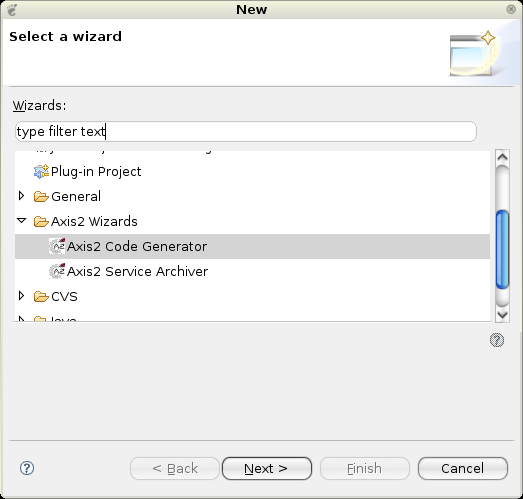
If the plug-in is properly installed you should see a new wizard under the
"New" section.(use the File -> New -> Other or Ctrl + N )

Selecting the wizard and pressing the "Next" button will start the code
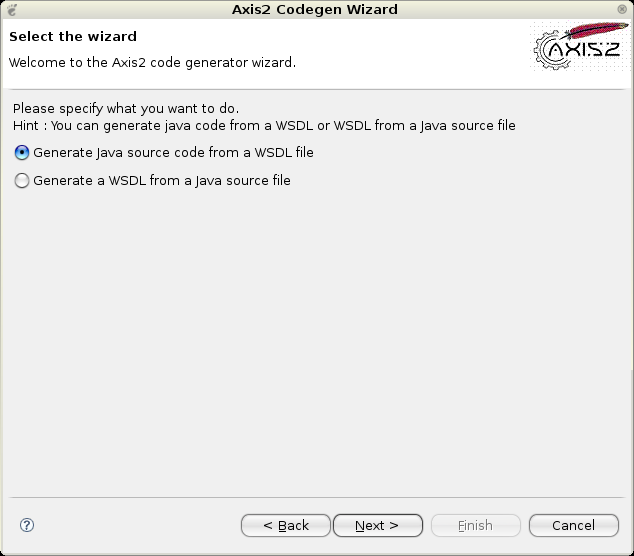
generator wizard. Following is the first wizard page.

Page 1:

Selecting the "Generate Java source code from WSDL file" option and
clicking "Next" leads to the following page.

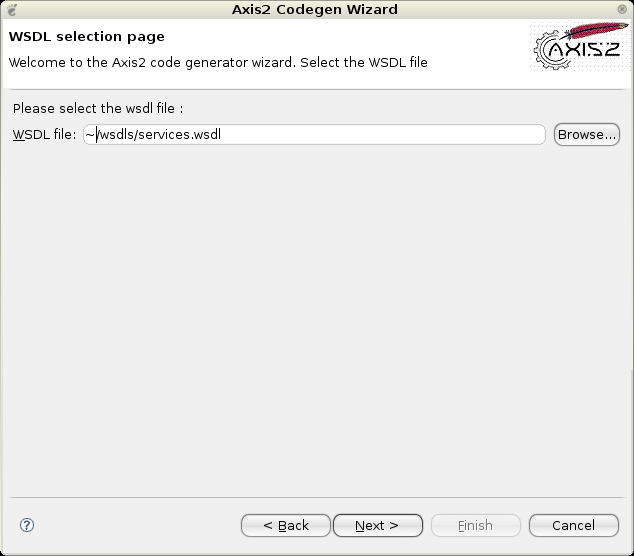
WSDL2Java Page 2 :

To move on to the next page the WSDL file location must be given. The
"Browse" button can be used to easily browse for a file rather than typing the
whole path.

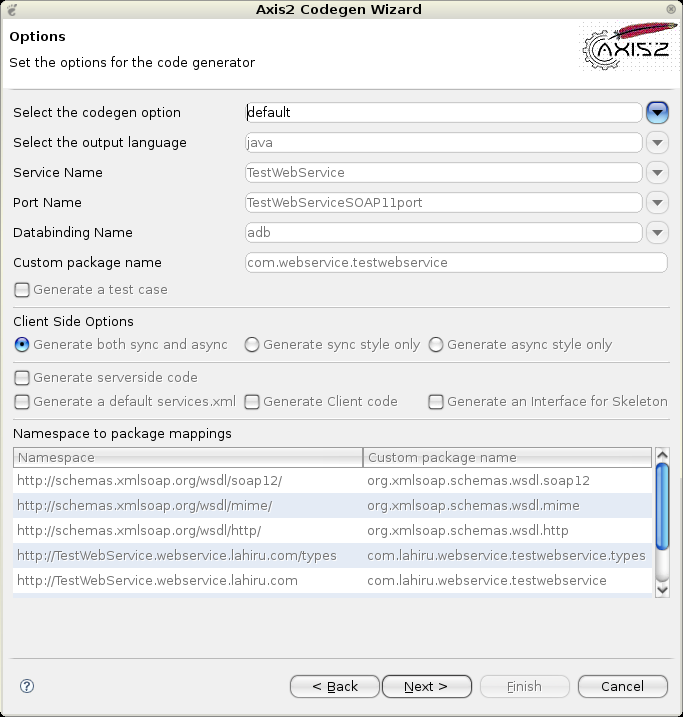
WSDL2Java Page 3 :

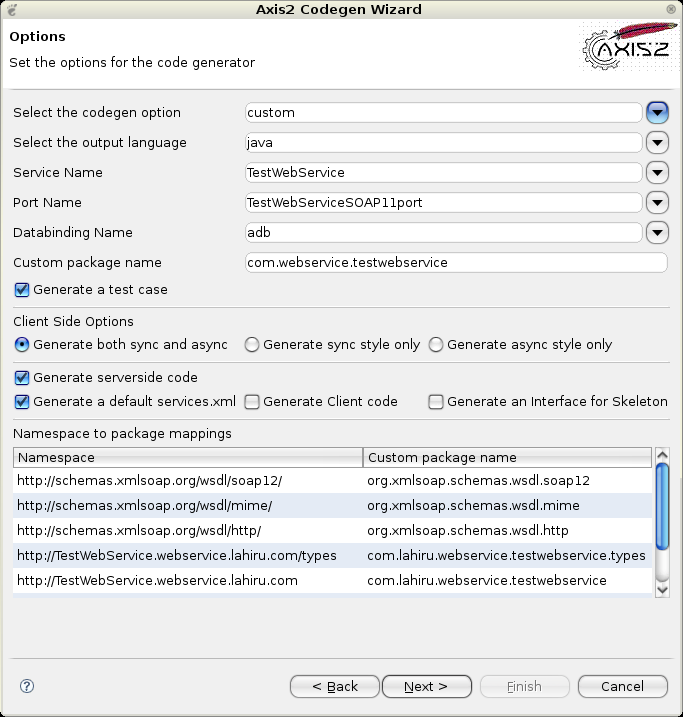
Once the WSDL file is selected, the next page will take you to the page
from where codegen options are to be selected. By far this
is the most important page in this wizard. This page determines the
characteristics of the code being generated.

Novices need not worry about these options since the most common options
are defaulted, but advanced users will find it very easy to turn the knobs
using these options.

What advanced users can do is select custom from the select codegen options
drop down list and then change/edit the fields that you need.

Once the options are selected, only the final step of the code generation
is left which is the selection of the output file location.

WSDL2Java Page 4 :

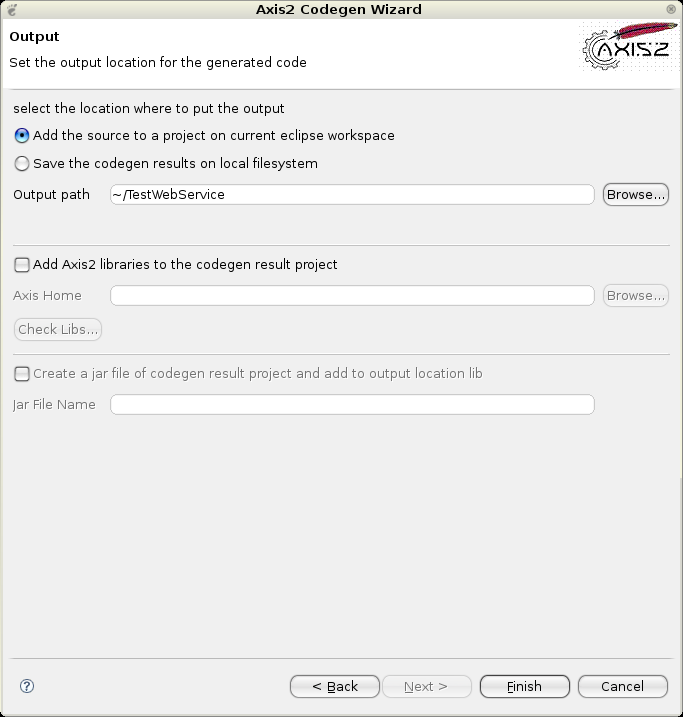
Here you can select the output file path by typing or browsing using the
"Browse" button. You have the option of browsing only eclipse workspace projects by
selecting the "Add the source to a project on current eclipse workspace" radio button.
Or else you have the option to save the codegen resutls to file system

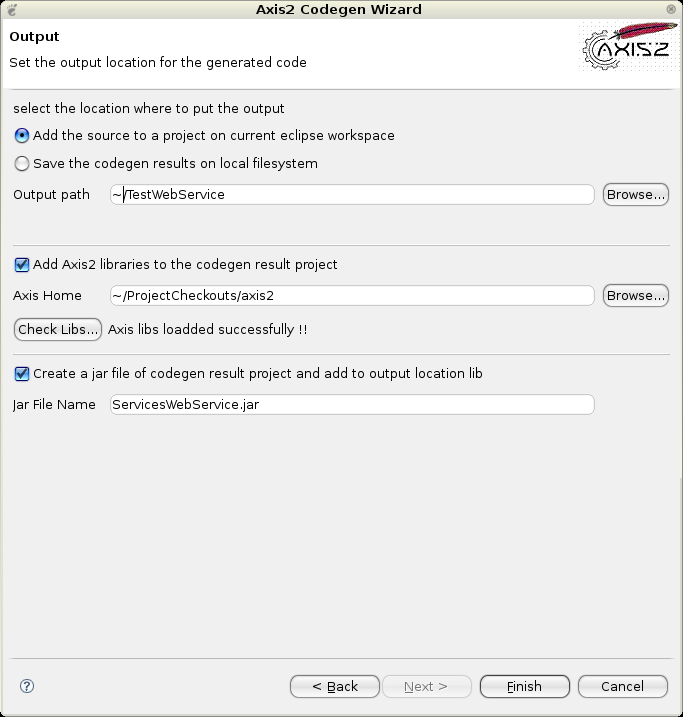
Here also you have the option to add some value to the codegen results.
If you have enabled the check box "Add Axis2 libraries to the codegen result project"
then all other controls below will get enabled. What you can do is point the downloaded
Axis2_HOME location via the "Browse" button. Then you can verify the availability of the Axis2
libs by clicking on the "Check Libs" button. If all goes well then you can add the axis 2 libs
to the codegen results location. Another option is available to generate a jar file if the user
needs to add the codegen results to a project as a compiled jar file to the selected locations
lib directory.

When the output file location is selected, the "Finish" button will be
enabled. Clicking the "Finish" button will generate the code and a message box
will pop up acknowledging the success. Well Done! You've successfully
completed Axis2 code generation.

Operation - Java2WSDL

Page 1:

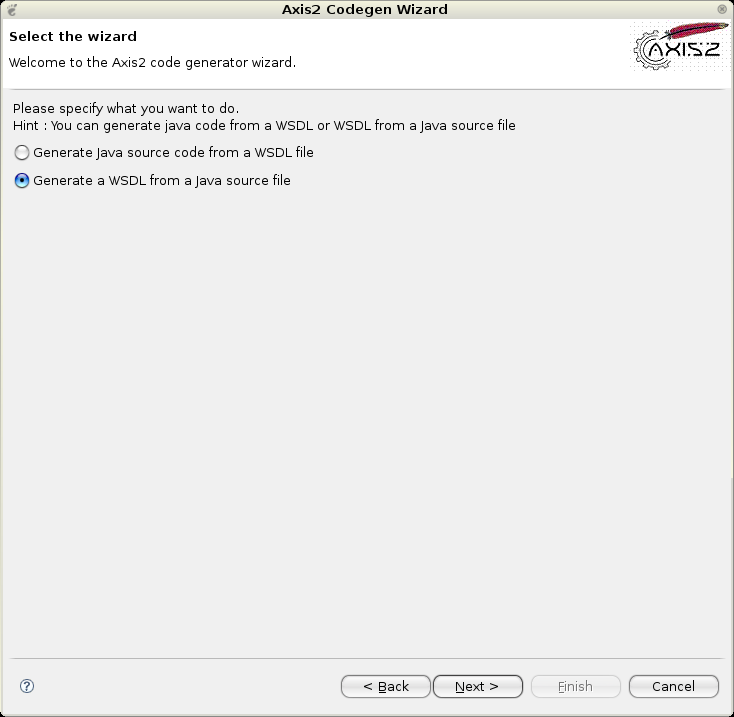
For this operation you need to select the option which says "Generate a
WSDL from a Java source file"

Then click the "Next" button which will lead to the next page below.

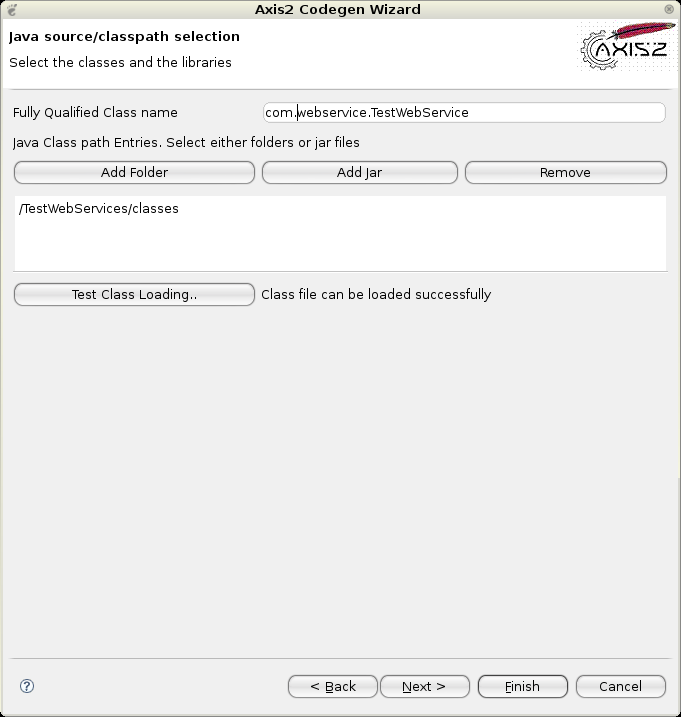
Java2WSDL Page 2:

In this page one needs to select the class to be exposed and the relevant
jar files /classes to be loaded as the classpath. After the libraries have
been set, the "Test Class Loading" button must be clicked in order to test
whether the class is loadable. Unless the class loading is successful
proceeding to the "Next" button will not be enabled.

Once the classloading is successful and "Next" button is clicked the page
below will appear.

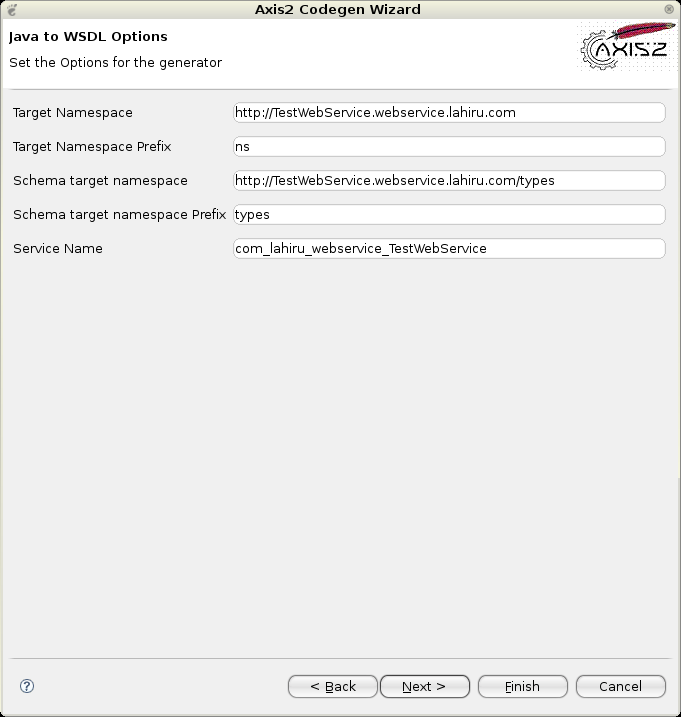
Java2WSDL Page 3:

This page allows the parameters to be modified by setting the options for
the generator.

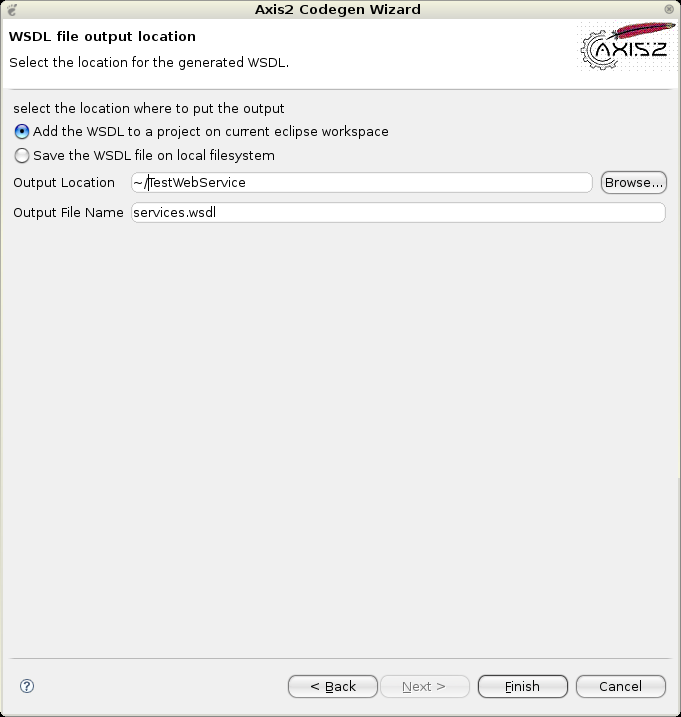
Java2WSDL Page 4:

Here you can select the output file path by typing or browsing using the
"Browse" button. You have the option of browsing only Eclipse workspace projects by
selecting the "Add the source to a project on current eclipse workspace" radio button
. Or else you have the option to save the codegen resutls to file system. Once the
output file location and the output WSDL file name is added you can click the "Finish"
button to complete generation.

If a message box pops up acknowledging the success, then you've
successfully completed the Java2WSDL code generation.


Source: Apache

quinta-feira, 12 de junho de 2008

Web Service Security implemented with some clicks

The NetBeans Enterprise Pack 5.5 comes bundled with:

  • Sun Java System Access Manager 7.1
  • Policy Agent 2.2

The use of NetBeans + GlassFish can be a good option for fast and secure development.

This link http://frsun.downloads.edgesuite.net/sun/07B00859/web_service_security.htm opens a movie showing how can be easy implement security resources such as Username Token using NetBeans.